
Your marketing team needs to explain why acquisition costs are rising while qualified leads remain flat. GA4 reports a decline in conversion rate. Google Ads shows increased spend. The CRM contains the latest lead statuses, but nobody has connected the three views. The CMO needs an answer before the next budget review. Analysts are reconciling metrics, and developers are checking whether tracking works as expected.
This is more than a reporting problem. It is a data integration challenge that can delay MarTech decisions and undermine confidence in marketing performance.
October 2026 brings several Google Analytics updates worth examining, from changes to Google Tag Manager to new ways of analyzing BigQuery data with Gemini. The opportunity is not simply to adopt new features. It is to understand how they affect measurement quality, reporting workflows, and the speed at which marketing teams can act.
Here is a quick overview of Google's October 2026 updates, their impact on marketing data integration, and the key actions analytics teams should consider.
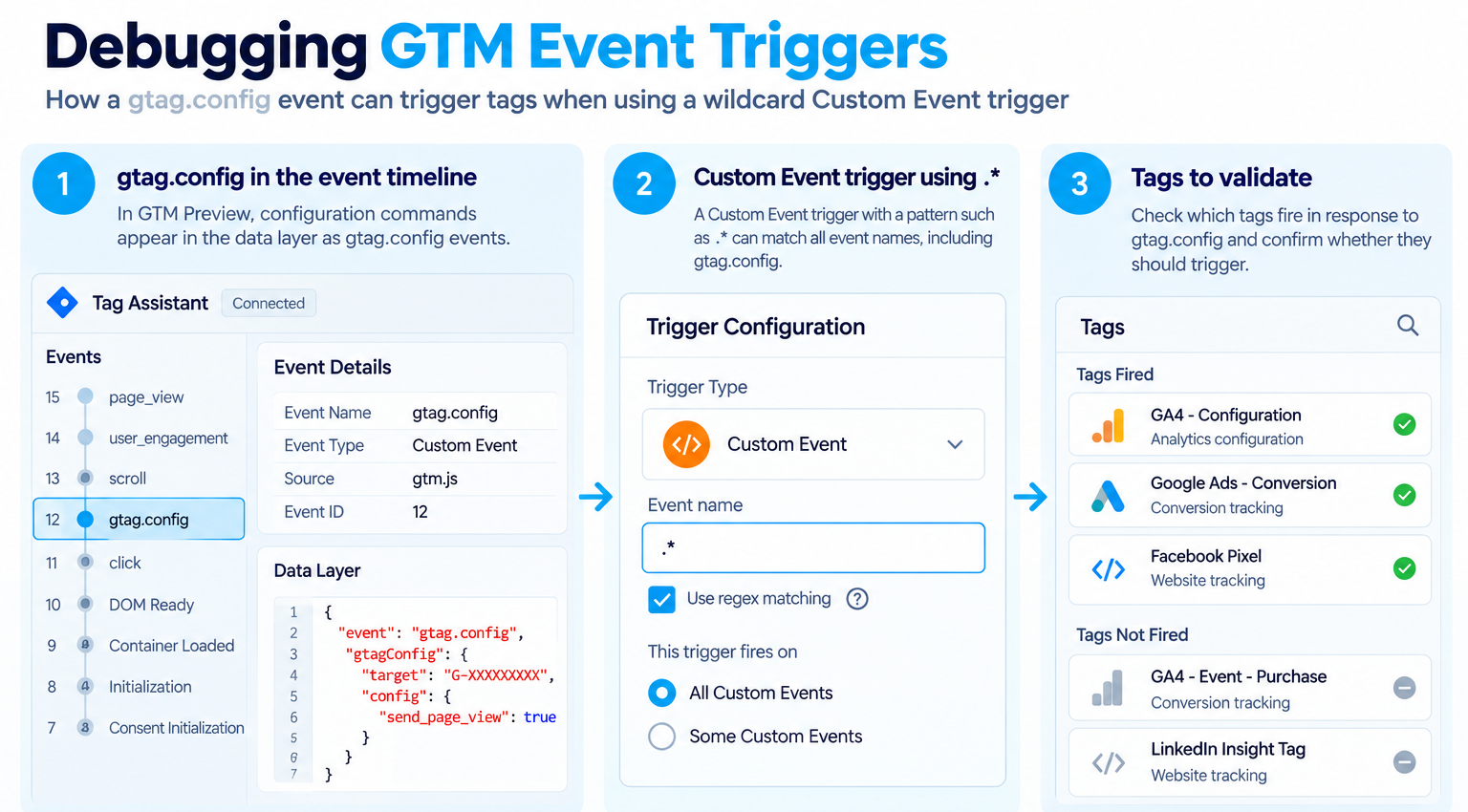
On October 8, Google standardized how Google Tag Manager handles gtag('config') commands. Configuration commands now appear in the data layer as gtag.config events. Google warns that wildcard Custom Event triggers may fire tags in response to these events.
Key takeaway
If a Custom Event trigger uses a wildcard pattern like .*, it may fire tags in response to gtag.config events. Review your triggers and validate conversion tracking before publishing changes.
On October 12, Google introduced an optimized container capability that allows data to be sent directly to supported Google measurement destinations, reducing the need for additional JavaScript for that purpose. The change also centralizes relevant destination settings and access management within GTM.

Suppose a GTM container uses a Custom Event trigger with a pattern such as .*, intended to match any event. That trigger could respond to gtag.config when it was designed for business events only.
Rather than assuming every website is affected, teams should review their own implementation.

For developers, this is a concrete debugging exercise. For marketing leaders, it protects the reliability of the conversion data used to evaluate campaigns.
On October 5, Google Analytics introduced the User Groups Admin API, enabling eligible administrators to manage user groups and membership programmatically. Supported operations include creating, editing, and deleting groups and assigning roles. Organization-level administrative permissions are required.
For enterprises managing analytics properties across regions, brands, and external agencies, maintaining access manually can become repetitive.
The API offers an opportunity to standardize administrative workflows. However, automation does not replace governance. Before implementation, define group ownership, property access requirements, and procedures for reviewing permissions when responsibilities change.
This connects analytics administration with Devrun's governance and compliance service: a connected data ecosystem needs appropriate access controls as well as reliable information flows.
On October 19, Google announced that Gemini could analyze connected BigQuery datasets through Google Sheets using natural-language questions. Users can explore data, ask follow-up questions, and create connected, refreshable tables, pivot tables, charts, and dashboards. Availability depends on the eligible Workspace or AI plan and data permissions.
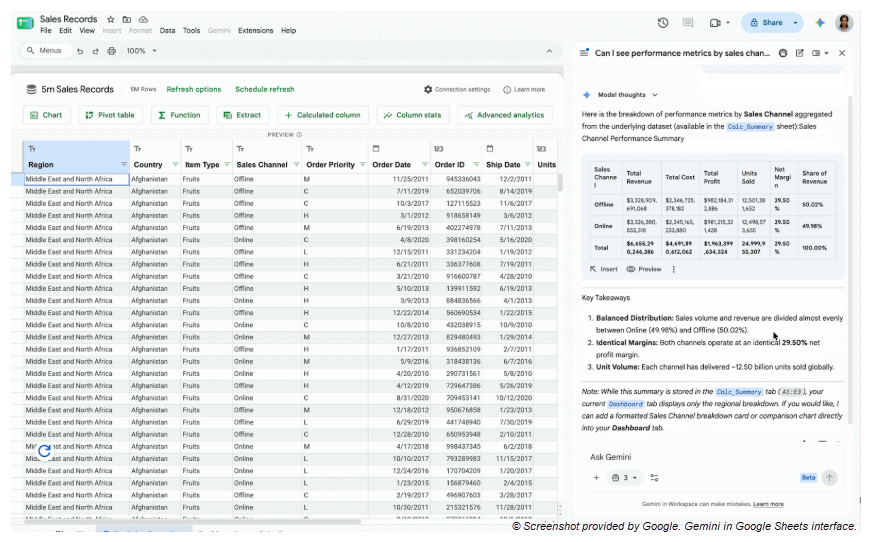
Imagine investigating why qualified leads declined despite higher advertising spend. An analyst could compare acquisition costs and qualified leads by channel across two periods, then explore which segments contributed to the change.
This creates another way to investigate MArTech performance without repeatedly building manual spreadsheet exports. But AI-assisted analysis does not automatically identify the cause of a change.
Before trusting the results, check whether the sources cover the same reporting periods, whether channel and conversion definitions are consistent, and when each dataset was last refreshed. GA4 sessions, advertising-platform clicks, and CRM-qualified leads are different measures and should not be treated as interchangeable.
The following illustrative query calculates cost per qualified lead from an already integrated reporting table.
Important: The table and fields are illustrative, not a Google-provided schema. The data model matters as much as the query. Joining campaign spend to multiple lead records without aligning the reporting grain can duplicate costs or lead counts. Validate join keys, deduplication rules, attribution assumptions, and source totals before trusting the results.
That is the difference between connecting data and building a trustworthy measurement system.
On October 22, Google Data Studio introduced support for connecting to a BigQuery Graph or querying a graph through custom SQL in the BigQuery connector. Graph measures can then be imported into reports as metrics.This is relevant to organizations modeling relationships among connected entities rather than relying exclusively on conventional tables. For example, a business could explore relationships between products and customer interactions if those relationships are represented in its graph data. Relevant measures could then be incorporated into reporting.
The update does not automatically unify marketing sources or create cross-channel attribution. Graph modeling, query design, and metric definitions remain essential. Before adopting the capability, ask: What business question can graph-based data help answer that existing reporting does not adequately explain?
These updates address different layers of the MarTech ecosystem. Their value becomes clearer when viewed as a workflow:
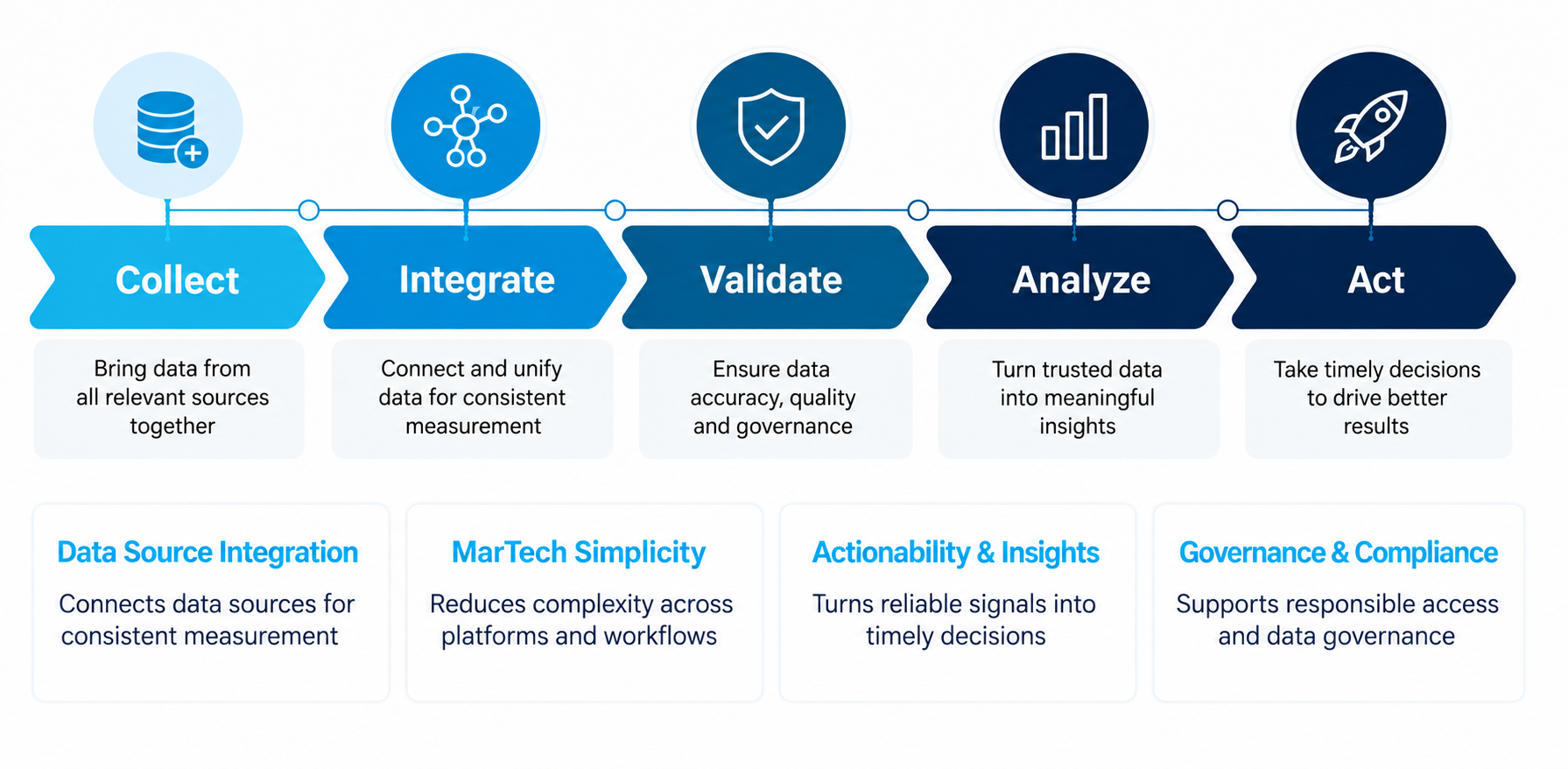
Return to the opening scenario. Paid media costs are rising, but qualified leads remain flat. A dashboard can reveal the decline; connected advertising, GA4, and CRM data can help the team investigate whether it relates to acquisition costs, traffic quality, lead qualification, or a measurement issue. For a deeper look at the investigation side of this workflow, read Devrun's article on GA4 dashboards and how marketing teams investigate performance. The goal is not to connect every available tool. It is to ensure that relevant information is consistent, accessible, and useful before a decision is made.
Start with three actions:
- Review GTM triggers and conversion tracking,
- Validate how campaign costs and business outcomes are integrated
- Evaluate whether Gemini-assisted BigQuery analysis can reduce repetitive reporting work.
These checks help marketing leaders move beyond asking whether a dashboard exists. The more useful question is whether the organization can trust the numbers enough to act on them. Real-time marketing performance is not simply about refreshing reports faster. It depends on reliable collection, connected data sources, and the ability to investigate meaningful changes while action is still possible.
Google Tag Manager — Official release notes, October 8 and 12, 2026.
Google Analytics — What's new in Google Analytics, October 5, 2026.
Google Analytics — Developer documentation for the User Groups Admin API.
Google Workspace Updates — Analyze BigQuery data using natural language with Gemini in Google Sheets, October 19, 2026.
Google Cloud — Data Studio release notes, October 22, 2026.